Digital Sales Room

By
Sammy Jones
How Do You Use Digital Sales Rooms to Drive Post-Sale Expansion and Upselling?
Digital sales rooms (DSRs) drive post-sale expansion by turning a closed deal room into a persistent, multi-stakeholder workspace where CS teams surface upsell signals, time conversations with behavioral data, and close expansion revenue 30–45% faster than email-only motions.
What makes a DSR more effective for expansion than email or slides?
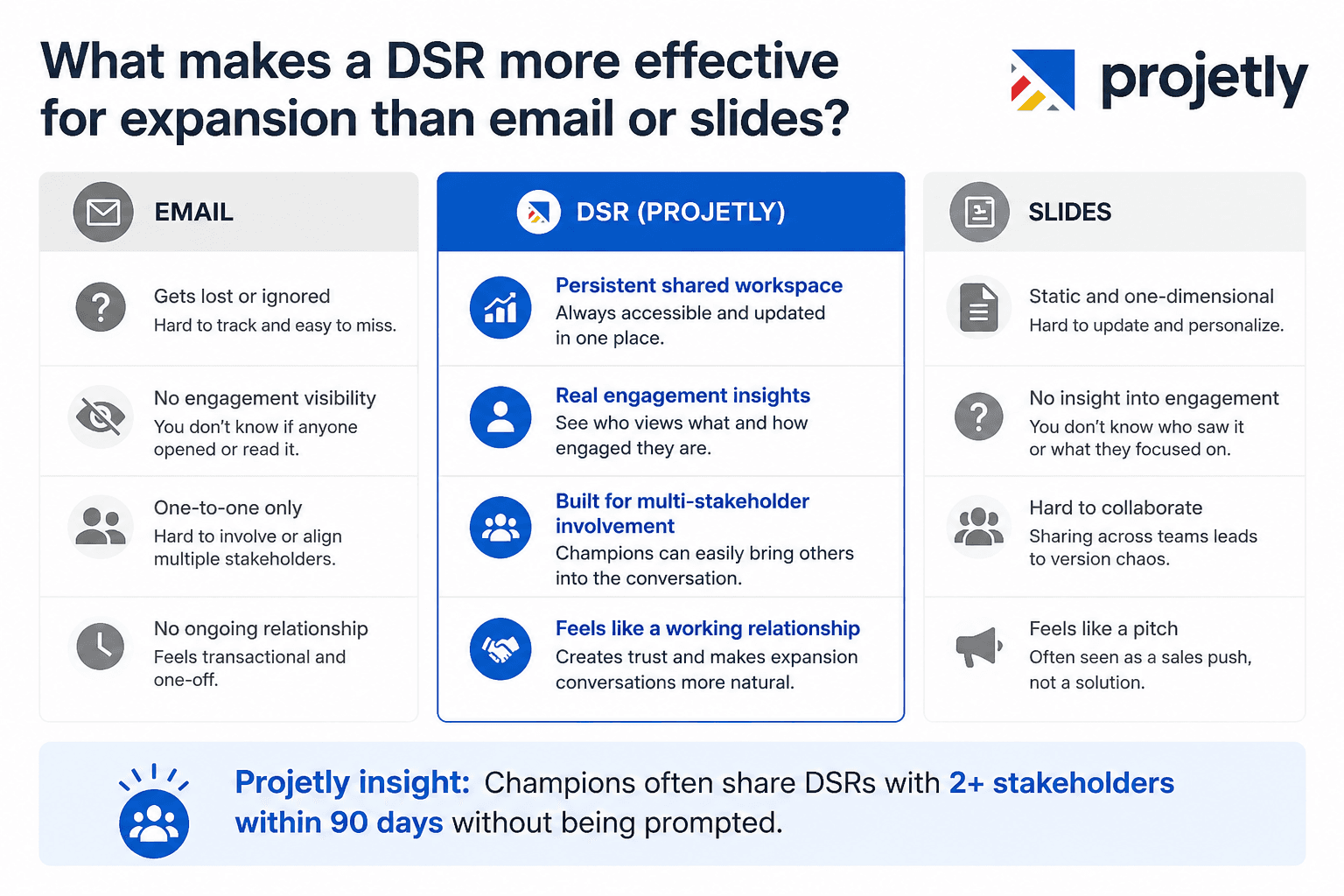
DSRs create a persistent shared workspace that customers can access on their own schedule, unlike scattered email threads or static slide decks.
Every interaction generates behavioral insights, showing who viewed the content, what they engaged with, and how much time they spent reviewing specific materials.
Traditional channels lack visibility, emails go unanswered, and presentations don't reveal whether key stakeholders actually reviewed them.
Expansion opportunities mirror enterprise sales cycles, involving multiple stakeholders, varying priorities, and champions who need to build internal consensus.
DSRs support complex stakeholder coordination, making them ideal for managing post-sale expansion conversations.
Customers already familiar with the DSR experience perceive it as a collaborative workspace, rather than another sales pitch.
Introducing upgrades or new pricing within an established DSR feels like a natural progression, not an unexpected sales outreach.
Existing trust in the workspace increases receptiveness to expansion and cross-sell conversations.
Projetly insight: Teams using Projetly's DSR for post-sale activities report that customer champions organically share the room with two or more additional stakeholders within the first 90 days, even without prompting.
When should you open a dedicated expansion room?
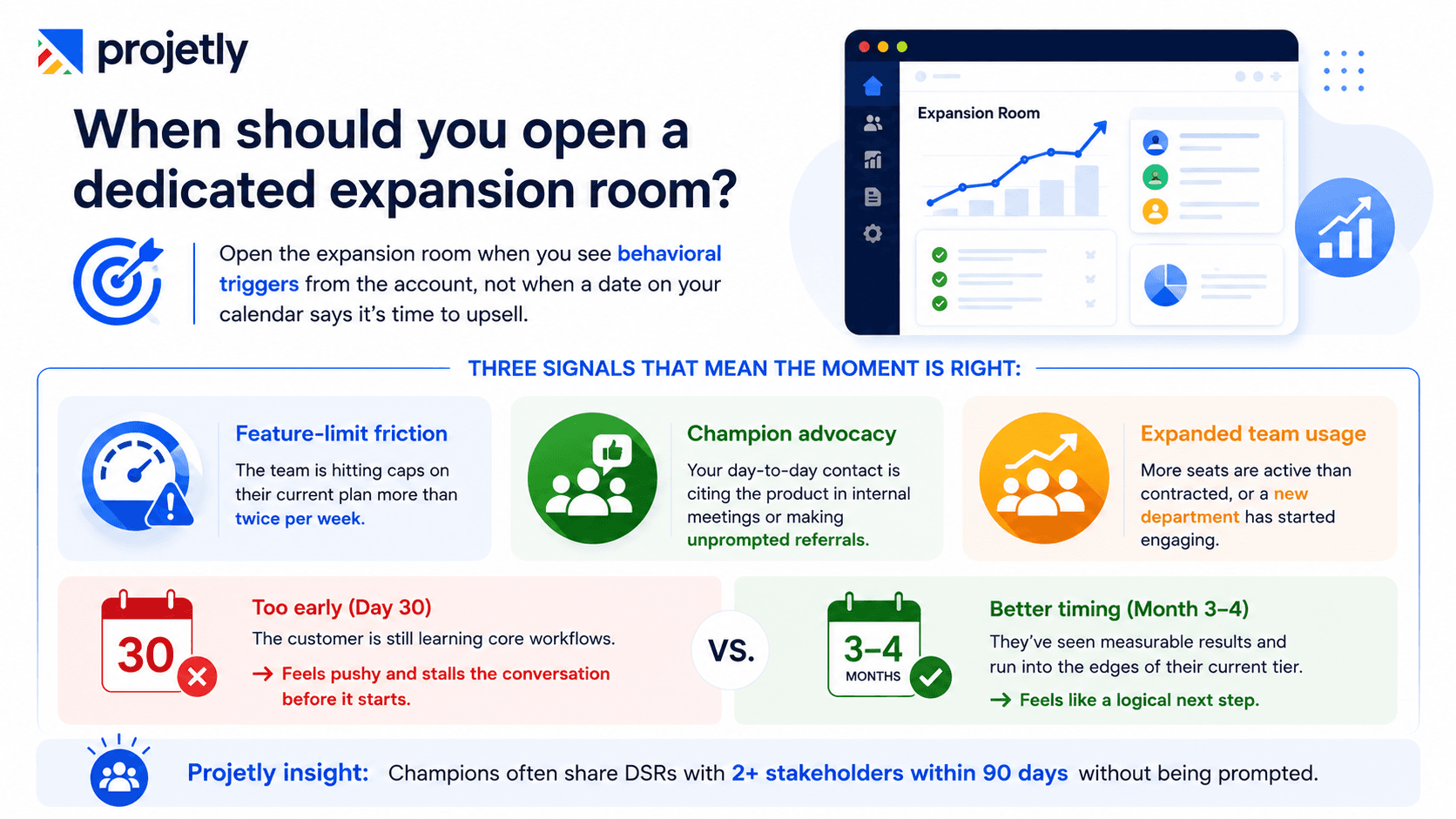
Open the expansion room when you see behavioral triggers from the account, not when a date on your calendar says it's time to upsell.
Three signals that mean the moment is right:
Feature-limit friction: The team is hitting caps on their current plan more than twice per week
Champion advocacy: Your day-to-day contact is citing the product in internal meetings or making unprompted referrals, with AI meeting notes often revealing these strong signs of internal advocacy and engagement.
Expanded team usage: More seats are active than contracted, or a new department has started engaging
Opening the room at day 30, while the customer is still learning core workflows, reads as pushy and stalls the conversation before it starts. Opening it at month three or four, after they've seen measurable results and run into the edges of their current tier, makes the same conversation feel like a logical next step.
What belongs in the expansion room
Content | Why it belongs |
|---|---|
Personalized value summary using their own usage data | Grounds the conversation in what they've actually achieved — not an average ROI claim |
Specific expansion proposal (named tier, module, or seat count) | Removes ambiguity; makes the decision concrete |
Peer proof from the same industry or role | Shows what happened after a comparable customer made the same move |
Mutual action plan with named owners and a target decision date | Gives the conversation a spine so it doesn't drift |
Embedded chat or book-a-call link | Let stakeholders ask questions without leaving the room |
How do you use DSR engagement signals to time an upsell conversation?
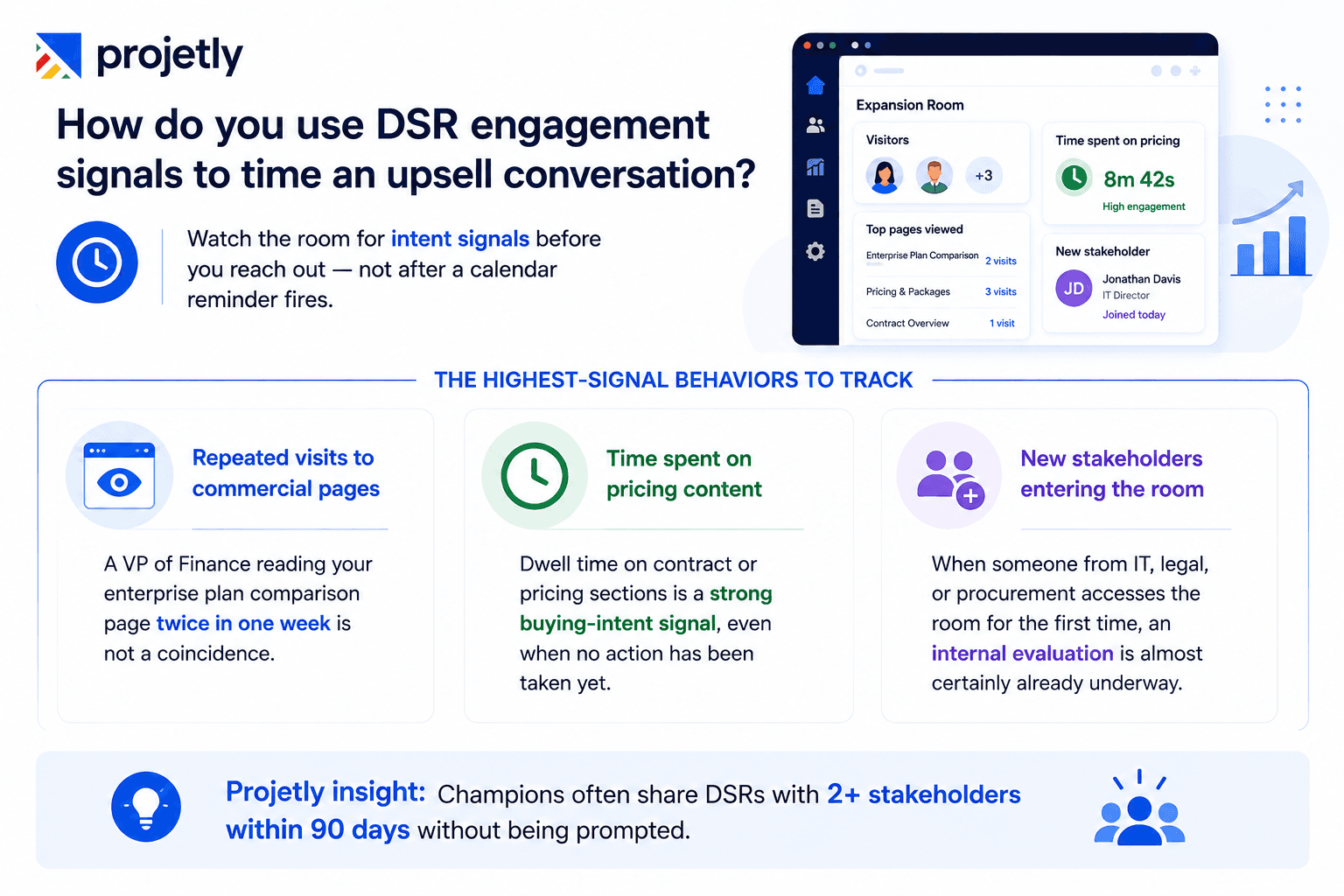
Watch the room for intent signals before you reach out, not after a calendar reminder fires.
The highest-signal behaviors to track:
Repeated visits to commercial pages: A VP of Finance reading your enterprise plan comparison page twice in one week is not a coincidence
Time spent on pricing content: Dwell time on contract or pricing sections is a strong buying-intent signal, even when no action has been taken yet
New stakeholders entering the room: When someone from IT, legal, or procurement accesses the room for the first time, an internal evaluation is almost certainly already underway
How to surface stakeholders who are evaluating silently
Gate high-value content, detailed pricing, advanced integration specs, security compliance documentation, behind a light email capture. Keep the rest of the room open. This surfaces people who were forwarded a link by your champion but weren't yet on your radar.
The result: instead of calling with "just checking in on the enterprise upgrade," you're calling with a specific, informed reason.
"I noticed your IT lead spent time in our security compliance section this week. I'd love to set up 20 minutes to walk through what that looks like for your specific environment."
That conversation gets scheduled. The first one gets ignored.
→ See how Projetly's engagement analytics surface expansion signals in real accounts
How do you turn an onboarding room into a living account hub?
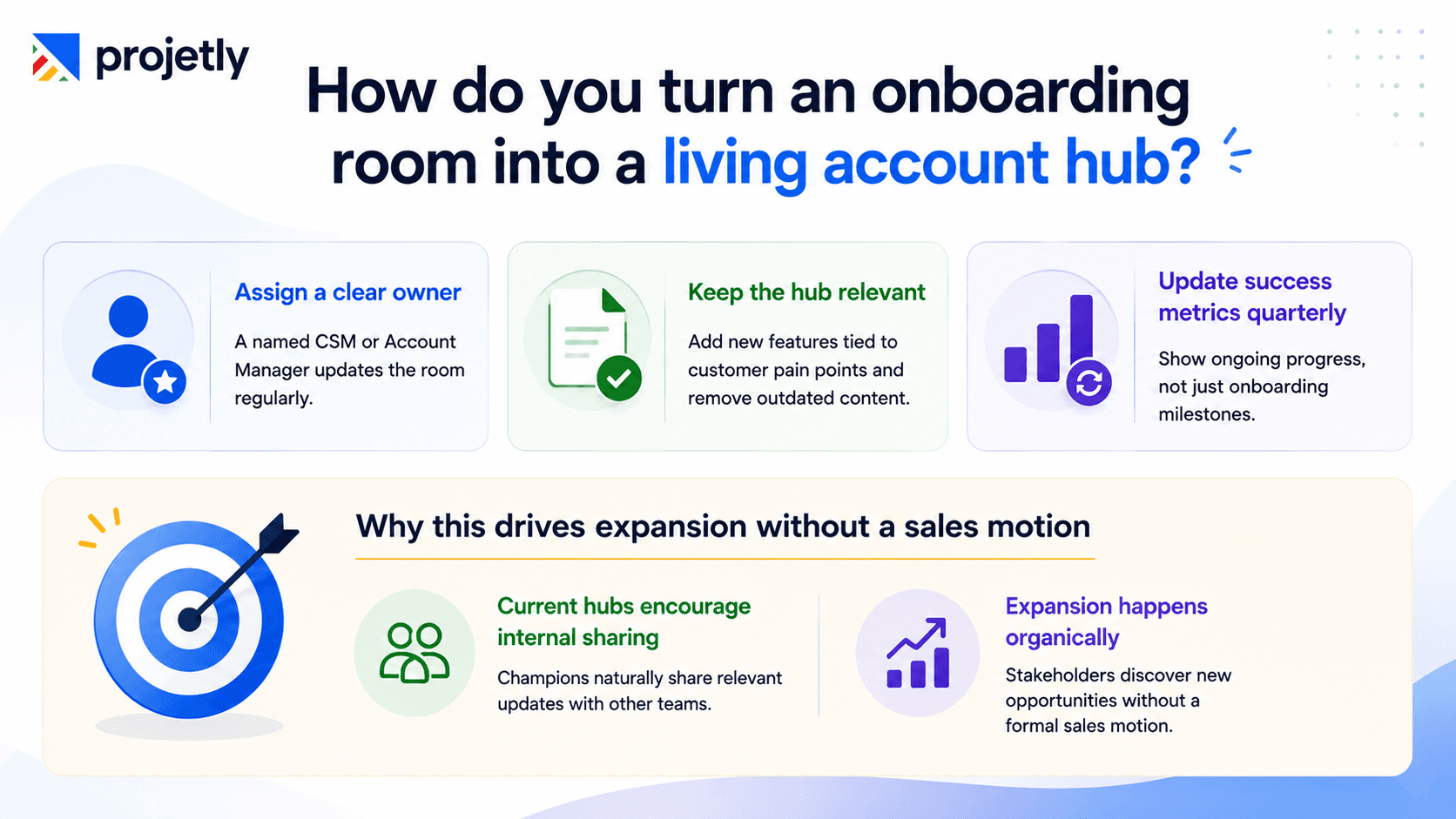
Assign a named owner (CSM or account manager) to update the room quarterly and monthly for strategic accounts. Not "the team." One person, accountable by name.
A room that looks identical to how it did on day one sends an implicit message to the customer: the energy that went into winning the deal didn't carry over into keeping it. That's the kind of signal that makes a competitor's outreach land.
What a living hub looks like at month six
New feature releases relevant to pain points raised during onboarding are added with a direct callout: "Given what you mentioned about the manual approval bottleneck during setup, this new workflow capability is worth a look."
Dated content, early onboarding materials, deprecated feature docs, outdated pricing, and cycles out on a defined schedule
Success metrics are updated every quarter, so the customer can see the account's trajectory, not just a snapshot from the sales process
Why this drive for expansion without a sales motion
When the hub is current, your champion has a natural, low-pressure way to share it internally: "Here's the workspace we use with our vendor, there's a section in there about the new automation features that might be relevant for the operations review."
That expansion conversation happens without you being in the room at all.
How do you personalize expansion content for a CFO, an IT lead, and a day-to-day champion at the same time?
Build one room with distinct sections for each stakeholder type. A single-track expansion conversation that tries to serve all three audiences at once will lose all three.
Stakeholder | What they need in the room |
|---|---|
Executive sponsor | Business impact summary from the current term; cost-of-delay framing for staying at the current tier |
Economic buyer (CFO / VP Finance) | Detailed pricing and packaging; total cost of ownership including migration; contract structure and payment terms |
Technical evaluator (IT / Security) | Feature specs for the expanded tier; integration and API docs; security certifications, data residency, and SSO details |
Day-to-day champion | What's new and what it means for their specific workflows, training resources, and a direct line to flag questions |
Why this structure helps your champion close the deal internally
The champion who's internally advocating for the expansion gets something genuinely useful: a room they can forward to each stakeholder with a one-line message, "Everything relevant to your role is in the section labelled for you, takes about five minutes to review."
That lowers the barrier to internal advocacy without requiring your champion to become a product expert for every stakeholder conversation they have.
→ Download How High-Performing B2B Teams Keep Enterprise Deals Moving
How do mutual action plans inside a DSR prevent expansion deals from stalling?
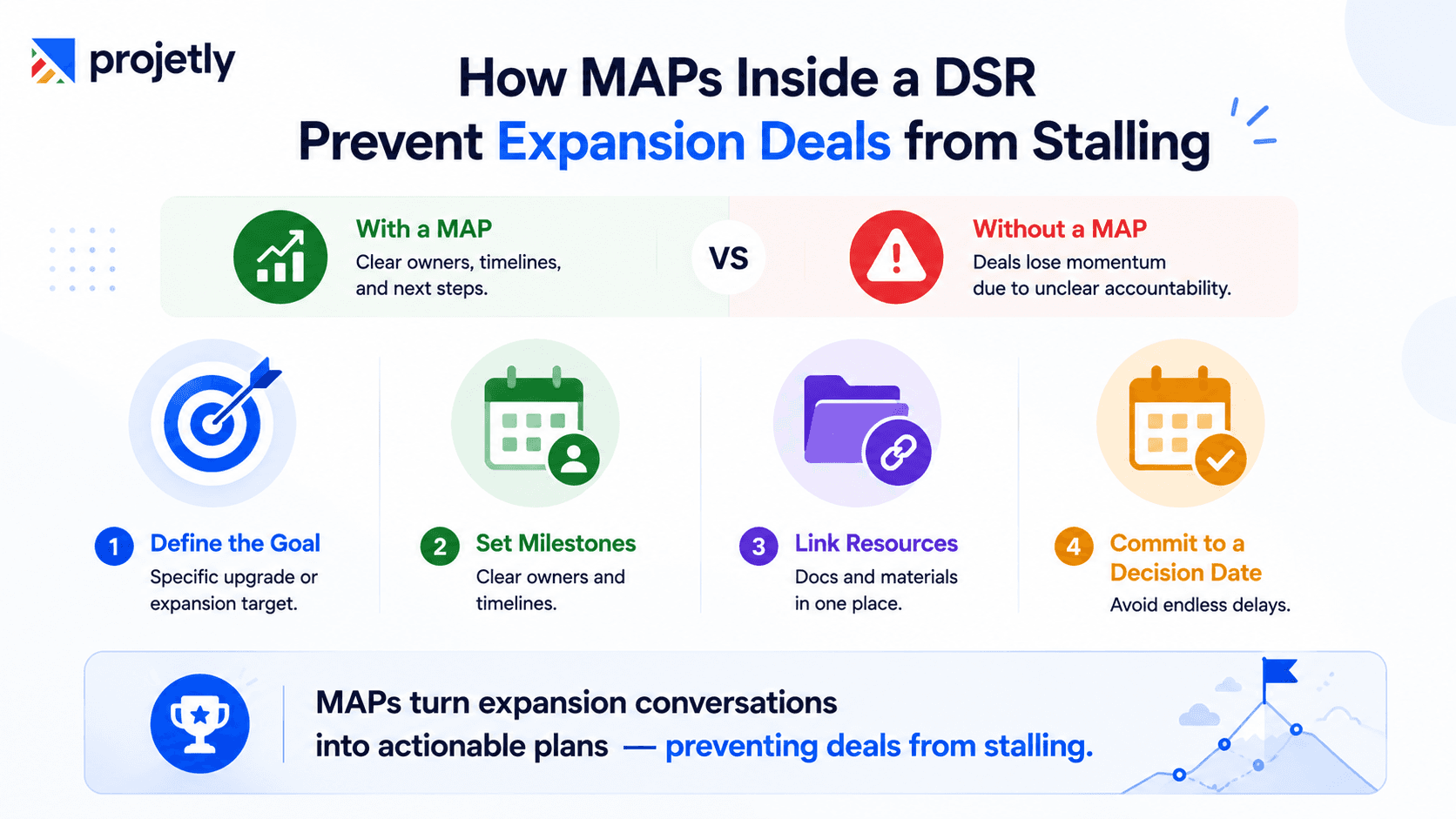
A mutual action plan (MAP) embedded in the expansion room turns a vague QBR commitment to "explore the enterprise tier" into a defined sequence with owners, dates, and linked content at each step.
Without a MAP, expansion conversations drift. Both sides are busy. No one owns the next step clearly. The conversation dies without anyone formally ending it.
What an expansion MAP includes
A well-structured MAP in Projetly defines:
The specific expansion on the table is named tier, module count, or seat number. Not "exploring options."
Defined evaluation milestones, each with an owner and a date:
Technical review complete (IT lead, end of week 3)
Business case submitted internally (champion, week 5)
Procurement vendor review complete (week 7)
Decision call scheduled (champion + AE, week 8)
Links to relevant room content at each milestone, so the IT lead knows exactly where the technical documentation lives, and procurement knows where vendor compliance forms are
A committed decision date with defined criteria for a yes or no, removing the ambiguity that lets decisions drift indefinitely
The accountability advantage
When a milestone slips, the CSM can reference the plan directly: "We had the IT review marked for last Friday, happy to push the timeline if something came up, but wanted to check in." That's accountability without pressure, which is exactly the tone that works in an established customer relationship.
How do you turn a QBR into an expansion close using a DSR?
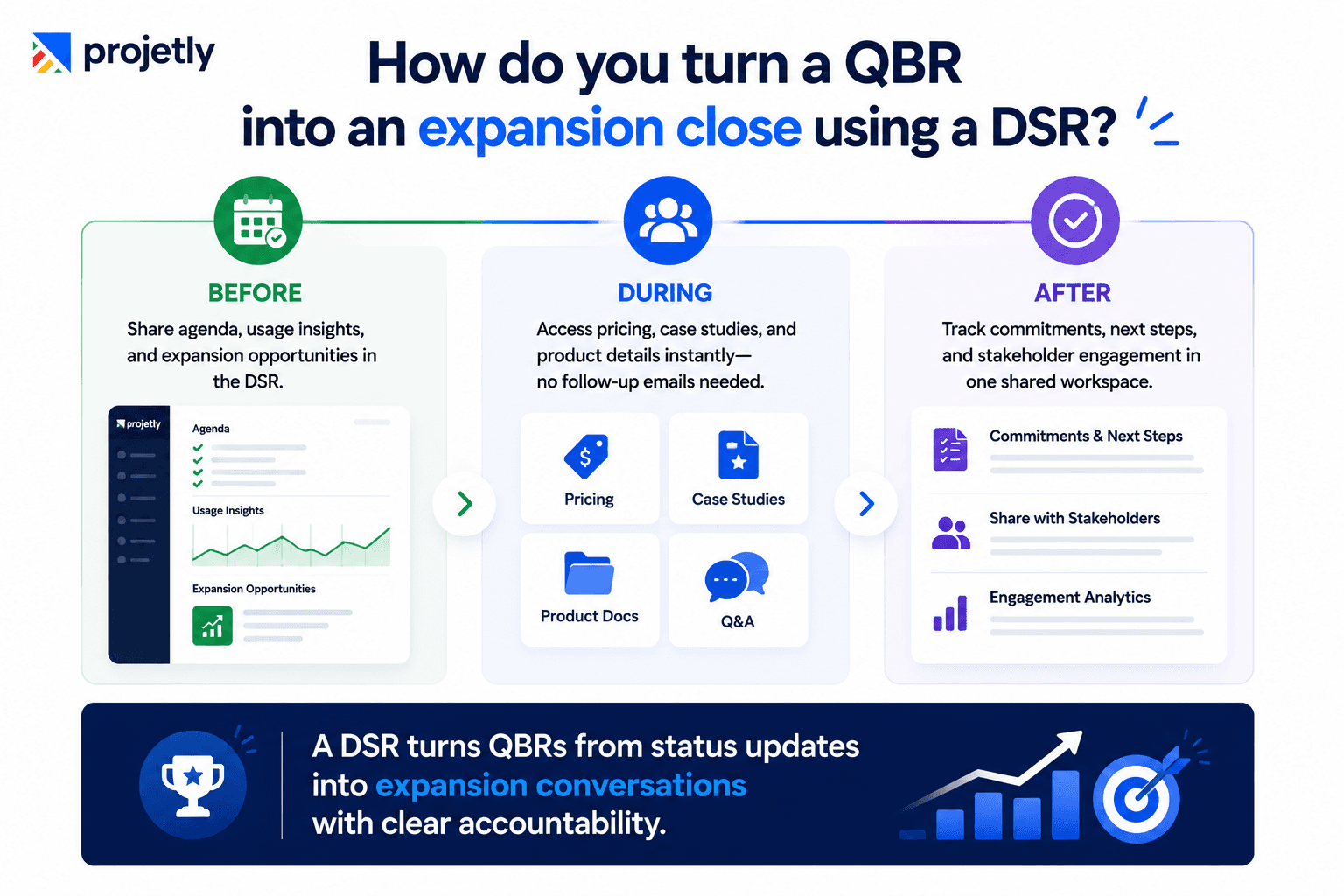
Populate the DSR before the QBR, keep it open during the review as a shared workspace, and let it serve as the only source of truth after the meeting ends.
Most QBRs follow a predictable pattern: the vendor presents slides, the customer politely engages, the meeting ends with vague commitments and a follow-up email that gets buried within 48 hours. There's no shared artifact and no accountability mechanism for the commitments made in the room.
A DSR changes each phase:
Before: The room is populated with the agenda, current usage data, and expansion content relevant to where the account is heading. Stakeholders can review it ahead of time, which makes the live conversation substantively more productive.
During: When an expansion topic comes up naturally, "given what you've achieved this quarter, here's what becomes possible at the next tier", the pricing, case studies, and product documentation are immediately accessible in the same room. No "I'll send you that later."
After: Every commitment and next step lives in the room. The champion can share it directly with stakeholders who weren't in the meeting. Engagement analytics show exactly who reviewed what, and when, so the follow-up call has a specific, informed reason to happen.
When a CFO wants to loop in procurement post-meeting, the champion shares the room, and everything procurement needs is already organized inside it.
→ Talk to our Projetly specialist
TL;DR
Open a dedicated expansion room at month 3–4, triggered by behavioral signals (feature-limit friction, expanded usage, champion advocacy) — not a calendar date
DSR engagement analytics surface which stakeholders are evaluating silently: repeated visits to pricing pages and new entrants from IT, legal, or procurement are your highest-intent signals
A living account hub updated quarterly keeps your champion with something genuinely shareable internally, driving expansion conversations that happen without you in the room
Multi-persona content tracks let a CFO, IT lead, and day-to-day champion each find what they need in one room — removing the barrier for internal advocacy
A mutual action plan embedded in the room converts QBR enthusiasm into a structured decision timeline with named owners and linked content at each milestone
Teams using DSRs for post-sale expansion report closing upsell motions 30–45% faster than email-only approaches, with champions sharing rooms with an average of two additional internal stakeholders in the first 90 days
Frequently Asked Questions
1. What makes a DSR more effective for expansion than email or slides?
A DSR generates behavioral data every time a stakeholder visits, showing you who looked at what and for how long. Email threads go dark, and slide decks don't tell you who forwarded them. That persistent visibility is what makes expansion conversations timely and informed rather than guesswork.
2. When should you open a dedicated expansion room?
Open it at month 3–4, triggered by behavioral signals like feature-limit friction, expanded seat usage, or unprompted champion advocacy, not a calendar date. Opening too early reads as pushy; opening after the customer has hit the edges of their current tier makes the conversation feel like a logical next step.
3. How do you use DSR engagement signals to time an upsell?
Watch for repeated visits to pricing pages, dwell time on commercial content, and new stakeholders entering the room for the first time. A VP of Finance reading your enterprise plan comparison twice in one week is an intent signal, not a coincidence. That's when you call, not after a weekly pipeline review.
4. How do you turn an onboarding room into a living account hub?
Assign a named owner to update the room quarterly, add new feature releases relevant to pain points raised during onboarding, and cycle out dated content on a set schedule. A room that looks the same as day one tells the customer the energy that went into winning the deal didn't carry over into keeping it.
5. How do you personalize expansion content for multiple stakeholders at once?
Build one room with distinct sections for each persona: the CFO needs pricing and TCO analysis, IT needs security specs and API docs, and the champion needs workflow use cases and training resources. This gives your champion something they can forward to each stakeholder with a one-line message, without having to become a product expert for every internal conversation.
6. How do mutual action plans inside a DSR prevent expansion deals from stalling?
A MAP embedded in the room converts a vague QBR commitment into a defined sequence with named owners, milestone dates, and linked content at each step. When a milestone slips, the CSM has a concrete reference point for the follow-up rather than a cold check-in. That's accountability without pressure, exactly the tone that works in an established customer relationship.
7. How do you turn a QBR into an expansion close using a DSR?
Populate the room before the review, keep it open as a shared workspace during the meeting, and let it serve as the single source of truth for every commitment made afterwards. When expansion topics come up naturally, pricing and case studies are immediately accessible, no "I'll send that over later." Engagement analytics after the meeting show exactly who reviewed what, so the follow-up has a specific reason to happen.
You may also like: 9 DSR Metrics That Improve B2B Sales Forecasting and Close Rates
You may also like

A Guide to Project Management Professional Certification

Laugh Your Way to Productivity: 50 Workplace Quotes

50 Funny Workplace Memes That’ll Brighten Your Workday.
What Does a Customer-First Mindset Mean? Explained in 2025

What It Takes to be a Great Customer Success Manager in 2025